
If you sell products online, you’ve probably seen product listings at the top of Google search results, in the Shopping tab, or mixed in with regular search results. You may have wondered how those products get there. For product-based eCommerce businesses, Google Merchant Center is a big part of that process.
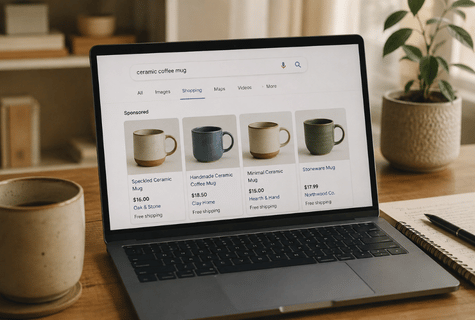
One common misconception is that you have to pay for Google Ads to show up in those product results. That isn’t always the case. Google offers both free product listings and paid Shopping ads.
Understanding the difference, and making sure Google has accurate information about your products, can help give your store more opportunities to show up when people are searching for what you sell.
What Is Google Merchant Center?
Google Merchant Center is the system businesses use to provide Google with information about the products they sell.
That information can include:
Product title
Description
Price
Availability
Product images
Brand
Product identifiers
Shipping information
Product URL
For many eCommerce platforms, this information can be synced automatically. Shopify stores, for example, can connect to Merchant Center through the Google & YouTube app.
The important part is that Merchant Center gives Google structured product information it can use to understand what you sell and determine where those products may be eligible to appear.
What Is Google Shopping?
Google Shopping can get confusing because people often use the term interchangeably to describe two different things. However, free product results and paid Shopping ads are not the same.
Free product listings
Eligible products can appear without paying for an ad. Google currently uses free product listings across areas that can include Google Search, the Shopping tab, Google Images, Google Lens, Google Maps, YouTube and Gemini.
Paid Shopping ads
Businesses can also connect Merchant Center to Google Ads and pay to advertise their products.
The product information still comes from Merchant Center, but the business is paying Google for advertising placement.
You can use free listings without running Shopping ads. We have many clients that use both.
How Does Google Get Your Product Information?
There are several ways to send product data to Merchant Center.
For eCommerce stores, the easiest method is often an integration between the store platform and Google. Shopify, for example, can sync product information into Merchant Center through the Google & YouTube app.
Using Shopify?
The information in your Shopify product records can affect more than what customers see on your website. Clean, complete product details also help platforms like Google understand what you sell.
Merchant Center can also receive product data through files, Google Sheets and the Merchant API. Google can use structured data from your website as well.
Whichever method you use to send product data to Merchant Center, information about your products needs to be accurate, useful and consistent.
That is one reason clean eCommerce product data matters beyond simply keeping your online store organized.
Does Having a Merchant Center Account Mean Your Products Will Show Up?
No. Connecting your store to Merchant Center makes your products eligible to participate, but it does not guarantee that every product will appear for every relevant Google search.
Google reviews products and assigns a status. Products may be approved, limited, not approved, processing or under review. Even an approved product still has to compete for visibility.
Google is trying to determine which products are most useful and relevant to the person searching. The quality of the information you provide helps Google make that determination.
Why Aren't My Products Showing on Google?
This is where we often see businesses assume that simply connecting their store to Google is enough. It isn't.
A good first step is to check the “Needs attention” section in Google Merchant Center. It will flag products with issues, warnings, or disapprovals that may be affecting visibility.
If products are not appearing, there are several things worth checking:
Are your products actually approved?
Start inside Merchant Center and look at the status of your products. A product can be connected to Merchant Center but still be limited, under review or not approved.
Does the price match your website?
If Merchant Center says a product costs $29.95 but the product page says $34.95, that can create problems. The same goes for availability. Google should not be receiving "in stock" from your product data while your website says the item is sold out.
Are your product titles useful?
A product title like Classic No. 12, might make sense internally, but it doesn't tell Google very much. Something more descriptive, such as Women's Classic Leather Crossbody Bag gives Google considerably more information about what the product actually is.
“Your product records are not just used as back-office data. They help marketplaces, advertising platforms and search engines understand what you sell.”
Do you have good product images?
Clear product photography matters. Google needs to understand what is being offered, and shoppers need enough information to decide whether they want to click.
Is important product information missing?
Depending on the product, Google may need information such as brand, GTIN, MPN, size, color, condition or other attributes. Not every field applies to every product, but incomplete product records can make it harder for Google to properly understand and categorize what you sell.
Do You Need Google Ads?
Not necessarily. It depends on your business and the products you sell. If your goal is simply to make your products eligible for Google's free product listings, you do not have to run Google Ads.
Paid Shopping campaigns can provide additional visibility, but free listings are a separate opportunity.
For a small business trying to improve its Google visibility, getting Merchant Center set up correctly and making sure product information is accurate is a logical place to start before automatically spending more money on advertising.
Start With the Basics
Google Merchant Center is not a magic switch that guarantees your products will suddenly appear everywhere on Google. It is part of a larger visibility system, with multiple factors in place, such as:
Your website needs to work.
Your products need accurate information.
Google needs to be able to understand what you sell.
Merchant Center needs to be configured correctly.
Your products need to meet Google's requirements.
Once those pieces are in place, you give Google more opportunities to understand and surface your products when someone is searching for what you sell.
For more ways to improve how your business appears across Google, visit our Google Visibility Resources.
If you’re not sure whether your Merchant Center account is set up correctly, why products are being limited or disapproved, or how your Shopify product data is feeding into Google, we can help.
Book a meeting to talk through what’s working, what isn’t, and what to fix next.